
- Coding
- Ages 7–11
- Beginner
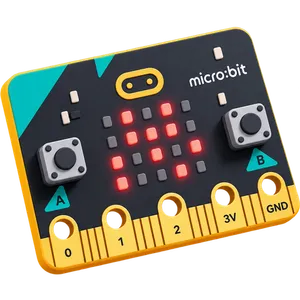
Micro:bit Computing
Code the micro:bit to make animations, games and gadgets.
Kids code the micro:bit, a pocket-sized computer with its own lights, buttons and sensors, from simple animations to games, music and smart gadgets.
What your kid will build
Animations, music, games and smart gadgets on the micro:bit.
- 01Flashing Heart Animation
- 02Shining Sunbeam Animation
- 03Display Family Names
- 04Countdown Timer
- 05Smiley Buttons
- 06Button Counter
- 07Microbit Banana Piano
- 08Microbit Cardboard Guitar
- 09Talking Microbit
- 10Math Quiz Bot
- 11Microbit Voting Machine
- 12Digital Coin Toss
- 13Virtual Dice Roller
- 14Rock-Paper-Scissors Game
- 15LED Tug of War Game
- 16Microbit Step Counter
- 17Interactive Night Light
- 18Light Level Meter
- 19Clap to Turn On LEDs
- 20Shout Out Game
- 21Magnetic Door Alarm
- 22Digital Compass
- 23Temperature Monitor
- 24Password Secret Locker
- 25Microbit Digital Wallet
- 26App Controlled LED Display
- 27Microbit Blockout Game
- 28Snap the Dot Game
- 29Dot Catching Game
- 30Microbit Maze Game
What they'll learn
Real engineering skills, built one project at a time through thinking, coding, and creating.
- Make animations, names and countdowns on the LED screen
- Use the buttons, microphone and speaker to build interactive gadgets
- Read the built-in light, temperature, motion and compass sensors
- Create games: dice, coin toss, rock-paper-scissors, tug of war and a maze
- Make music and talking projects, like a banana piano
- Build smart gadgets: a step counter, a door alarm and a password locker
- Control the micro:bit from a phone app
- Think step by step: plan, test and fix their own code
Why parents choose us
One mentor, one kid
Live 1-on-1 classes, so your kid gets the mentor's full attention.
Hands-on, every class
Your kid makes real projects in every class, not just watches.
Their own pace
Lessons follow your kid's level and interests, not a fixed syllabus.
See their progress
A personal learning dashboard shows what they built and learned, class by class.

Parents often ask
Does my kid need any experience?
No. Kids can start as complete beginners. In the free demo class the mentor checks what your kid already knows and recommends where to begin.
Do we need any equipment?
For the demo, a laptop or desktop with internet is enough. For the course, your kid also needs a micro:bit board.
How does the free demo class work?
Book with the form or on WhatsApp and we will message you to fix a time. Your kid joins a live session with a mentor, builds something small, and you get an honest recommendation. No payment details are needed.
What are the fees?
Want to know the course fees? Click the WhatsApp icon and message us for pricing details.
Ready to start Micro:bit Computing?
Book a free demo class. Your kid builds something real in the very first session.
 Chat on WhatsApp